Example review
Exactly the warm grey we needed.
The colour on the wall is close to the sample, and the finish was easy to work with.
Fictional example · Colour accuracy 5/5
Product & store reviews · Shopify app
Collect product and store reviews, photos and videos. Ask about quality, fit or finish, and keep the feedback connected to the right Shopify products.
Free plan · 14-day paid plan trial · Online Store 2.0
Product-specific feedback
Ask for an overall rating and optional scores for the properties customers care about. Show that context beside reviews, photos and videos.
Interactive example with fictional reviews. Attribute filters are included on Growth and Pro.
Website demonstration
Showing all 3 example reviews
The colour on the wall is close to the sample, and the finish was easy to work with.
Fictional example · Colour accuracy 5/5The finish is even, but the colour reads a little cooler in our north-facing room.
Fictional example · Colour accuracy 4/5The application was straightforward. We should have ordered a larger sample first.
Fictional example · Colour accuracy 3/5Inside Rootmade
Configure your review workflow in Shopify, then check how it looks for customers.
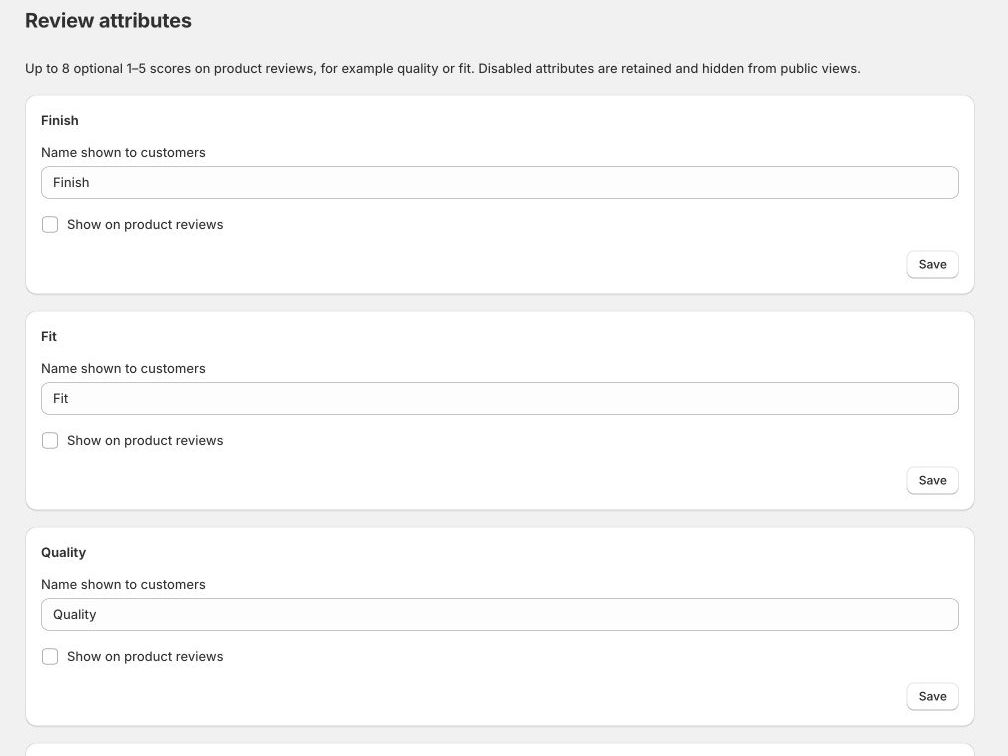
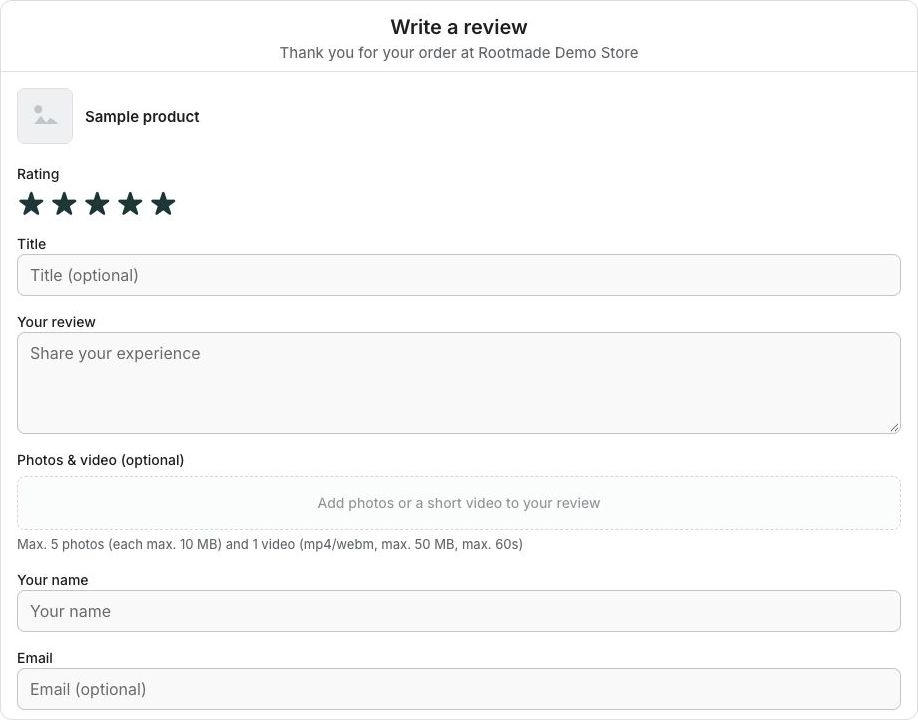
Marketing + customer service · Pro
Respond to a customer problem and manage publication in a connected workflow, with a clear next step for each team.
01 / Marketing
Review the submission, moderate the text and media, and decide what is published. Internal service notes stay private.
02 / Customer service
Hand a review to customer service manually or use automatic problem flagging. Open service tasks appear in a separate inbox.
03 / Shared context
Record the service outcome and a note for marketing. Closing a service task does not publish the review; marketing keeps that decision.
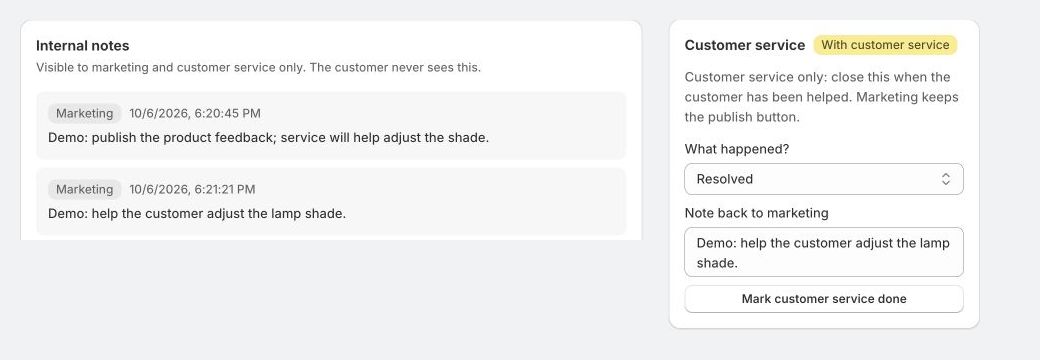
Pro includes team handoff, automatic flags and publication deadlines. Standard moderation and private team notes are included on Free.
Everything in one view
See what each part of the app does and which plan includes it.
Invite customers to share their experience after an order.
Keep the information shoppers need beside the overall score.
Add review blocks through the Shopify theme editor.
Keep publication and migration decisions under your control.
Keep service follow-up and review publication as separate decisions, with the outcome in the same review record.
Start with included delivery and connect other tools when you need them.
Your sending workflow
Choose how invitations are sent before editing the messages.
All plans
Rootmade sends your review invitations. Edit the messages in Email templates; no separate sending account is required.
All plans
Use a working address on your store’s domain. The app walks you through domain ownership and sending-record verification.
Growth + Pro
Receive review-request events in Klaviyo. Create and activate the flows there, and edit the messages in Klaviyo.
Getting started
Keep the first setup small, then roll it out across your product templates.
Open the app in Shopify admin and choose the plan that fits your store.
Choose Default delivery, edit your messages and set the timing after fulfilment or delivery.
Add Rootmade app blocks in an Online Store 2.0 theme. Check desktop and mobile, then save the theme.
Free · Growth · Pro
Choose the allowance and controls that fit your store. All plans include reviews, imports and Default email delivery.
The essentials
Collect and show useful reviews with included delivery.
No subscription fee.
Contact RootmadeMore from your reviews
Add richer review displays and connect your marketing tools.
14-day trial through Shopify.
Contact RootmadeYour teams, connected
Connect marketing and customer service in one review workflow.
14-day trial through Shopify.
Contact Rootmade| Feature | Free | Growth | Pro |
|---|---|---|---|
| Orders with review invitations / 30 days | 100 | 1,000 | 5,000 |
| Total media storage | 1 GB | 5 GB | 10 GB |
| Product & store reviews, photos/video | Included | Included | Included |
| Optional attribute scores and score bars | Included | Included | Included |
| Basic widgets, default carousel, colours and labels | Included | Included | Included |
| CSV/Yotpo imports, export and moderation | Included | Included | Included |
| Internal notes, personal data checks and text/media moderation | Included | Included | Included |
| Review incentives | Included | Included | Included |
| Google product review XML feed | Included | Included | Included |
| Default delivery & verified own sender | Included | Included | Included |
| One automatic reminder per order | Included | Included | Included |
| Product Q&A | — | Included | Included |
| Attribute filters & extra display controls | — | Included | Included |
| Product grouping | — | Included | Included |
| Klaviyo & outgoing webhooks | — | Included | Included |
| Marketing / customer service handoff & inboxes | — | — | Included |
| Automatic problem flagging & publication deadlines | — | — | Included |
| AI problem classification (connection required) | — | — | Included |
Clear allowances. Each unique order counts once when its review invitation cycle starts, regardless of products or split shipments. Each order allows an initial invitation, one reminder or manual resend, and one thank-you email. Klaviyo invitation orders also count; merchant notifications do not. Media storage is a total allowance and does not reset monthly.
There are no automatic overage charges. At the order limit, new invitations wait for the next period or an upgrade. Follow-ups for orders already counted continue within their sending cycle. At the storage limit, new media uploads stop; existing reviews and exports remain available.
Growth and Pro are billed per store every 30 days through Shopify, excluding applicable taxes. Trial eligibility and the start of charges appear on Shopify’s approval screen. Klaviyo subscriptions and sending fees are separate.
Contact RootmadePractical questions
Rootmade supports Online Store 2.0 through Shopify app blocks. Place blocks in a compatible section or an Apps section, and configure each template you use. Older themes are not supported.
Yes. CSV and Yotpo imports include product matching and a preview. Download the sample and read the steps.
Yes, after you verify a domain you control and activate the sender. Use a real mailbox so customer replies reach you.
New invitations wait for the next period or an upgrade. Follow-ups for already counted orders continue within their sending cycle. Full storage prevents new media uploads. Existing reviews remain available, and there are no automatic overage charges.
An import alone is not proof of a purchase. Keep the source and verification information accurate when migrating reviews.
Rootmade Reviews